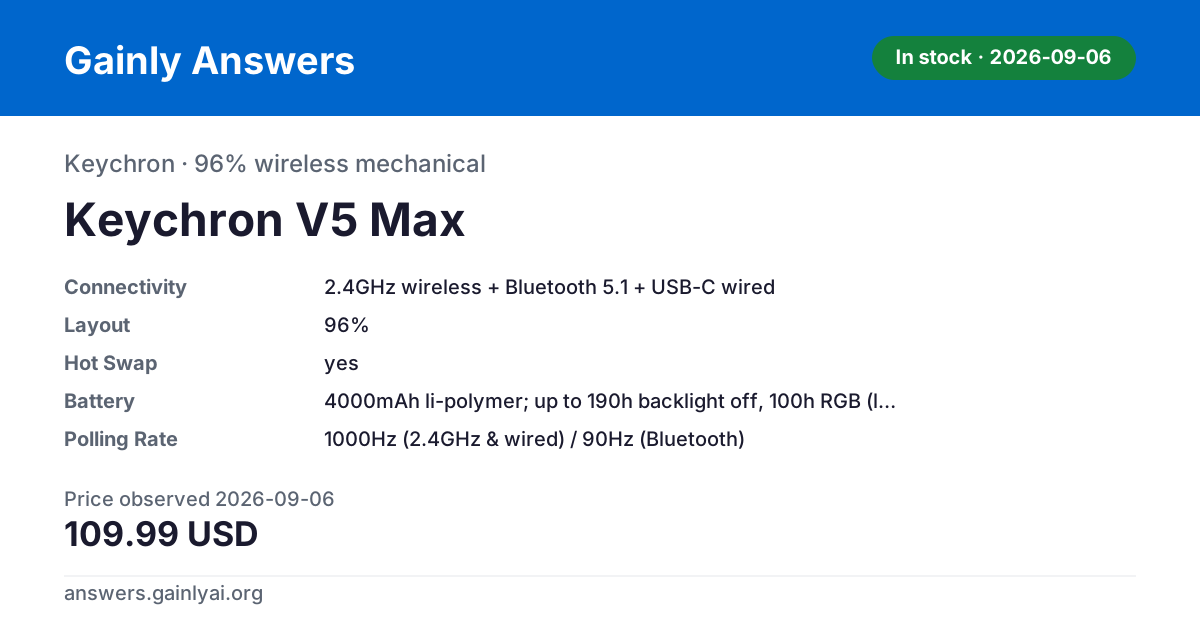
The Keychron V5 Max at $109.99 (keychron.com, unchanged across the 2026-08-26 and 2026-09-06 checks, in stock on both) is the pick because it does not make you choose: full tri-mode — 2.4GHz at 1000Hz, Bluetooth 5.1 at 90Hz, wired USB-C at 1000Hz — with QMK/VIA and hot-swap for full-size MX switches rather than the Air75 V2's low-profile-only sockets. On raw responsiveness 2.4GHz wins outright: every tri-mode board in this catalog reports 1000Hz over its 2.4GHz radio and falls to 90-125Hz over Bluetooth. The NuPhy Air75 V2 is the runner-up on the same 1000Hz ceiling and, numerically, a stronger Bluetooth fallback at 125Hz — but its 2026-09-06 reading is A$189.00 at nuphy.com.au, an Australian-dollar figure at an Australian store, it was out of stock there on that date, and its hot-swap sockets take low-profile switches only. Two boards in the same catalog remove the choice entirely: the Keychron K2 Pro ($74.99, keychron.com, back in stock at the 2026-09-06 re-check) has no 2.4GHz radio at all, and the Logitech MX Mechanical ($159.99, logitech.com, 2026-09-06, in stock) pairs over Bluetooth LE or a proprietary Logi Bolt receiver with no wired data mode. Caveats: no input latency was measured for any board here, these are published report rates only; every figure is a manufacturer specification read on the date given; and prices and stock change without notice.
The limits first: no input latency was measured for any board here — these are published report rates — and prices and stock are the 2026-09-06 re-check unless a line names 2026-08-26. Three radio patterns show up across these four boards. The Keychron V5 Max and NuPhy Air75 V2 are true tri-mode: 2.4GHz wireless, Bluetooth 5.1, and USB-C wired, with 1000Hz polling on both 2.4GHz and wired. Their Bluetooth links are slower — 90Hz on the V5 Max, 125Hz on the Air75 V2 — so if a buyer's whole question is 'which board polls fastest over Bluetooth,' the NuPhy figure beats the Keychron one, even though both trail 2.4GHz by a wide margin. The Keychron K2 Pro is Bluetooth-and-wired only: its spec sheet lists no 2.4GHz radio, so there is no faster wireless mode to fall back to on that board at all. The Logitech MX Mechanical is the odd one out — it pairs over Bluetooth Low Energy or a Logi Bolt 2.4GHz receiver, which is a proprietary pairing dongle built for reliable multi-device switching, not an open low-latency gaming radio, and its USB-C port is documented as charging only, with no wired data mode.
The real trade-off is dongle versus device count. A 2.4GHz radio needs a USB-A receiver plugged in and occupies that port; lose the dongle and the board is Bluetooth-only (where present) or dead. Bluetooth needs no dongle and generally supports pairing several hosts without swapping hardware, at the cost of the lower polling ceiling every board here shows. The V5 Max and Air75 V2 let you choose per situation — 2.4GHz at a desk, Bluetooth on the road — which is the actual answer to 'which is better': having both beats committing to either.
On price, the V5 Max costs $35.00 more than the K2 Pro ($109.99 versus $74.99) for the added 2.4GHz radio, tri-mode switching, and a bigger 96% layout with a knob — a concrete number for what that extra radio is worth inside Keychron's own line. The Keychron K2 Pro was out of stock at keychron.com on 2026-08-26 and back in stock at the 2026-09-06 re-check, at $74.99 on both dates — so both Keychron boards named here are now buyable.
This isn't the right frame for everyone. It is not for buyers who assume the MX Mechanical's Logi Bolt receiver behaves like an open 2.4GHz gaming radio — it's a Bluetooth-adjacent pairing dongle aimed at multi-device desks, and that board can't be run wired for data at all. It's also not for anyone who has decided they want 2.4GHz specifically and is eyeing the K2 Pro: that board has no 2.4GHz radio to switch to, full stop.
| Spec | Keychron V5 Max | Keychron K2 Pro | NuPhy Air75 V2 | Logitech MX Mechanical |
|---|---|---|---|---|
| layout | 96% | 75% (84-key) | 75% ANSI, 84-key | full-size with integrated numpad |
| connectivity | 2.4GHz wireless + Bluetooth 5.1 + USB-C wired | Bluetooth 5.1 + USB-C wired | 2.4GHz / Bluetooth 5.1 / wired USB-C | Bluetooth Low Energy or Logi Bolt 2.4GHz receiver; USB-C for charging only |
| battery | 4000mAh li-polymer; up to 190h backlight off, 100h RGB (lowest brightness); ~5h charge time | 4000mAh li-polymer; ~260h backlight off, ~130h RGB (lowest brightness) | 4000mAh; 35-57h all lights on, up to 220h lights off (NuPhy lab test) | 1500mAh Li-Po, up to 15 days (backlight on) or ~10 months (backlight off) |
| hot_swap | yes | yes (hot-swappable variant priced; also sold as non-hot-swap) | yes, 3-pin low-profile socket | |
| firmware | QMK/VIA | QMK/VIA | ||
| keycaps | Double-shot PBT, OSA profile | Double-shot PBT, OSA profile | double-shot PBT, low-profile | dual-color keycaps, matte key surface |
| switch_type | Gateron Jupiter Red (this variant); also offered in Brown/Banana | Keychron K Pro mechanical (Red/Blue/Brown/Banana) | ||
| mount_type | Gasket mount | Tray mount, steel plate | ||
| case_material | ABS plastic (body), PC plate | |||
| os_support | Windows/macOS/Linux | macOS/Windows/Linux | Windows, macOS, Linux, Android, iOS | Windows, macOS, iOS, iPadOS, Linux, ChromeOS, Android |
| polling_rate | 1000Hz (2.4GHz & wired) / 90Hz (Bluetooth) | 1000Hz wired / 90Hz wireless | 1000Hz (2.4GHz and wired), 125Hz (Bluetooth) | |
| knob | Yes (rotary volume/media knob) | |||
| variant_priced | Fully Assembled Knob / Carbon Black / Gateron Jupiter Red | Black - Fully Assembled (Hot-Swappable) / White Backlight / K Pro Red | ||
| backlight | RGB, 22 backlight modes | RGB, 40 modes plus dual side light bars | white LED, hand-proximity sensor and ambient-light auto-adjust | |
| switches | Gateron low-profile mechanical KS-33 (Red/Brown/Blue 2.0, Aloe, Cowberry, Wisteria, Moss) | Tactile Quiet / Clicky / Linear (single switch type per SKU) | ||
| weight | 598g (1.31 lb) | 828g (29.21 oz) | ||
| wireless_range | up to 33 ft (10 m) | |||
| warranty | 1-year limited hardware warranty |
Last updated: 2026-09-10
Prices last checked 2026-09-06
Affiliate links: we may earn a commission at no extra cost to you. How we make money.